

Carson @Carson183065
United States Joined February 2026-
Tweets45
-
Followers0
-
Following38
-
Likes119

𝐇𝐨𝐰 𝐭𝐨 𝐂𝐡𝐨𝐨𝐬𝐞 𝐭𝐡𝐞 𝐑𝐢𝐠𝐡𝐭 𝐀𝐏𝐈 𝐀𝐫𝐜𝐡𝐢𝐭𝐞𝐜𝐭𝐮𝐫𝐞 𝐟𝐨𝐫 𝐘𝐨𝐮𝐫 𝐏𝐫𝐨𝐣𝐞𝐜𝐭? Grab API Design Handbook: codewithdhanian.gumroad.com/l/nbfkk


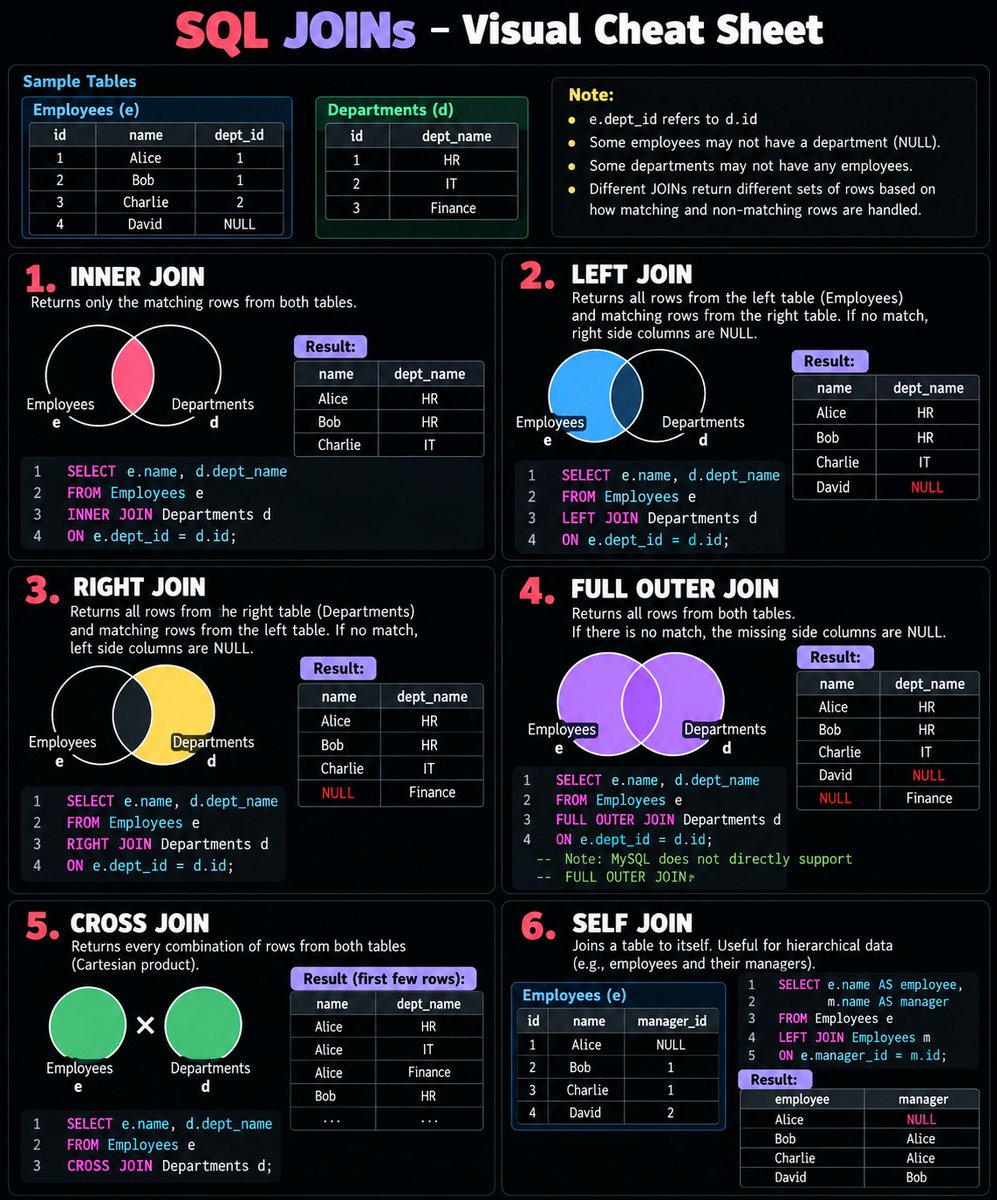
SQL JOINs made simple 🎯 Stop memorizing JOINs. Understand what each one returns. 🔹 INNER JOIN → Matching rows 🔹 LEFT JOIN → All rows from the left table 🔹 RIGHT JOIN → All rows from the right table 🔹 FULL OUTER JOIN → All rows from both tables 🔹 CROSS JOIN → Every possible combination 🔹 SELF JOIN → A table joined to itself Save this cheat sheet for your next SQL interview. 📌 Which JOIN do you use most often?
Computer Architecture and Organization


N/w Topology by @TheCyberPatron_ #cybersecurity #cybersecurityawareness #infosec #SOC #Networks #cheatsheet


Production Debugging Playbook, Part 2: Debugging 5xx Errors A spike in 5xx errors is a symptom, not a root cause. The service returning the error may not be the service causing it. Here's how to investigate. 1. Scope the impact • Error rate vs. total request volume • Affected endpoints, regions, instances, and versions • Recent deployments or configuration changes • Changes in latency, traffic, and resource usage 2. Trace the failing request Follow the request across the gateway, application, and downstream dependencies. Example: Product Service returns 502, but the trace shows it spent most of its time waiting for Pricing Service. The failure surfaces in Product Service; the underlying problem may be Pricing Service. 3. Interpret the status code • 500: Application exception or processing failure • 502: Invalid or unexpected upstream response • 503: Service unavailable, overloaded, or unhealthy • 504: Upstream response timeout These are clues, not root-cause diagnoses. The component generating the response determines what the code tells you. 4. Correlate the three signals • Metrics: Which error rates, latencies, or saturation levels changed? • Traces: Where did the request fail or stall? • Logs: What exception, timeout, or connection failure occurred? Use trace/request IDs to connect evidence across services. 5. Validate the hypothesis If Pricing Service is suspected, check its latency, error rate, logs, and connection pools. Compare the incident timeline with deployments and configuration changes. Also investigate retries. They can amplify load on an already struggling dependency. Follow the evidence beyond the immediate timeout to find the underlying cause. 6. Fix and verify Roll back faulty deployments, fix application errors, address resource exhaustion, or correct dependency/network issues. Adjust timeouts and retries only when the evidence supports it. Then verify recovery using the same metrics that exposed the incident. Confirm errors and latency have normalized without creating new problems. The debugging sequence: Detect → Scope → Trace → Correlate → Validate → Fix → Verify Don't assume the service returning a 5xx is the root cause. Follow the request, gather evidence, and prove the fix worked. Next: Debugging CPU, Memory & Resource Saturation.

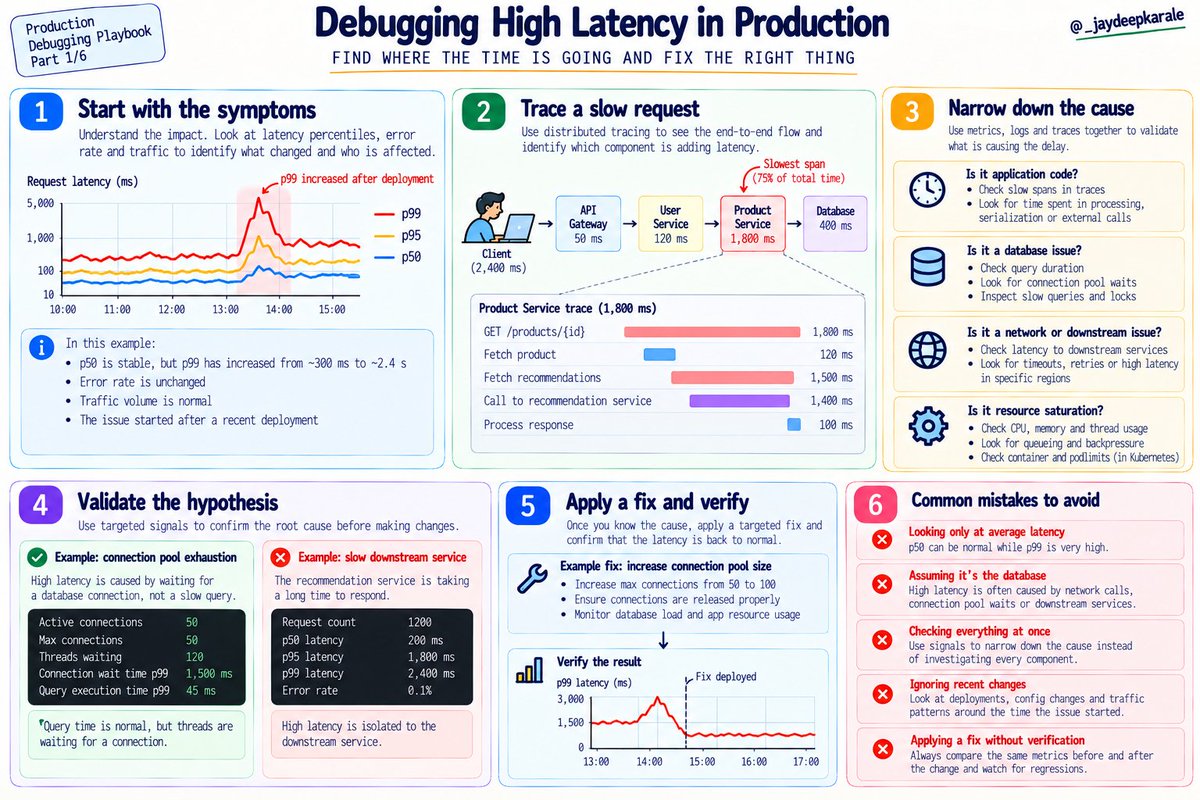
🎉 New Series Production Debugging Playbook Part 1/6 : Debugging High Latency Your API is responding slowly. Before increasing CPU, adding database indexes, or scaling your service, find out where the time is actually going. Here's how I'd approach this as a production

If you're aiming for the CKA certification, Or just diving into Kubernetes projects, here's one thing you can't ignore: 👉 Cluster configurations. Also, when it comes to the CKA certification, You will get scenarios to rectify issues in the cluster. So understanding cluster configurations will make it easier to troubleshoot and find issues the right way. 📘 If you're preparing for CKA certification, we have a detailed study guide 𝗖𝗵𝗲𝗰𝗸 𝗶𝘁 𝗼𝘂𝘁 𝗵𝗲𝗿𝗲: github.com/techiescamp/ck… Have you ever had to troubleshoot a tricky cluster config? PS: ♻️ Repost if you find this useful. It helps the DevOps community Have any thoughts to add? Drop them in the comments below. #kubernetes #practicaldevops #cka


🎉 New Series Production Debugging Playbook Part 1/6 : Debugging High Latency Your API is responding slowly. Before increasing CPU, adding database indexes, or scaling your service, find out where the time is actually going. Here's how I'd approach this as a production engineer. 1. Start with latency percentiles Average latency can hide serious problems. If most requests take 100 ms but a small percentage take 2 seconds, the average might still look acceptable while some users experience a painfully slow application. • p50 (median): 50% of requests complete within this time. It represents the typical request. • p95: 95% of requests complete within this time. The slowest 5% take longer. • p99: 99% of requests complete within this time. The slowest 1% take longer. Compare these percentiles over time and break them down by endpoint, region, service version, or customer segment where relevant. If p50 stays stable but p99 spikes, investigate what makes a subset of requests slow. If all percentiles rise together, look for a broader bottleneck. 2. Trace a slow request Metrics tell you that latency increased. Distributed traces help you understand where the time is spent. Imagine a request passing through an API gateway, user service, product service, and database. A distributed trace breaks the request into spans, showing the duration and relationships between operations. Look for the slowest spans, repeated downstream calls, retries, and time spent waiting for dependencies. One important detail: don't simply add every span duration together. Parent spans often include the time spent in their child spans, and parallel operations can overlap. Use the trace timeline to understand the actual critical path. 3. Identify the real bottleneck Once you know which component is slow, investigate the reason. • Application: Check CPU saturation, thread or worker exhaustion, garbage collection, and slow external calls. • Database: Separate query execution time from connection acquisition waits. Inspect slow queries, execution plans, locks, and connection pool utilization. • Network or dependencies: Check DNS resolution, connection establishment, timeouts, retries, and downstream service latency. • Caching: Inspect cache hit rates, misses, eviction patterns, and cache response times. Don't assume that a slow database span means the SQL query itself is slow. The application might be waiting for a connection, a lock, or a response across the network. Use logs for request-specific context, metrics to understand system behavior, and traces to connect the stages. Correlate them using timestamps, trace IDs, and relevant deployment events. 4. Validate your hypothesis before changing anything Suppose p99 latency jumps from 300 ms to 2.4 seconds after a deployment, but the error rate remains stable. A trace shows that the request spends most of its extra time waiting for a database connection. Pool metrics confirm that all connections are occupied, while query execution time remains normal. Now you have evidence for connection pool exhaustion, not a slow SQL query. Investigate why the pool is exhausted, apply a targeted fix, and compare the same signals before and after. Verify that latency recovers without increasing database load or introducing new errors. The principle to remember: Observe the symptom. Locate the delay. Test the hypothesis. Verify the fix. Senior engineers don't debug by trying every possible solution. They use evidence to eliminate possibilities until the root cause becomes clear. Next in the series: Debugging 5xx Errors & Failed Requests.
Last night, a swarm of Claude Opus 5.5 agents working for 14 hours and burning 387 million tokens were able to fully reverse engineer and decompile Kubernetes, including the scheduler, API server, and controller manager. Full source code available here: github.

Joe Bryant with his son, Kobe. RIP Mamba 🙏🏽


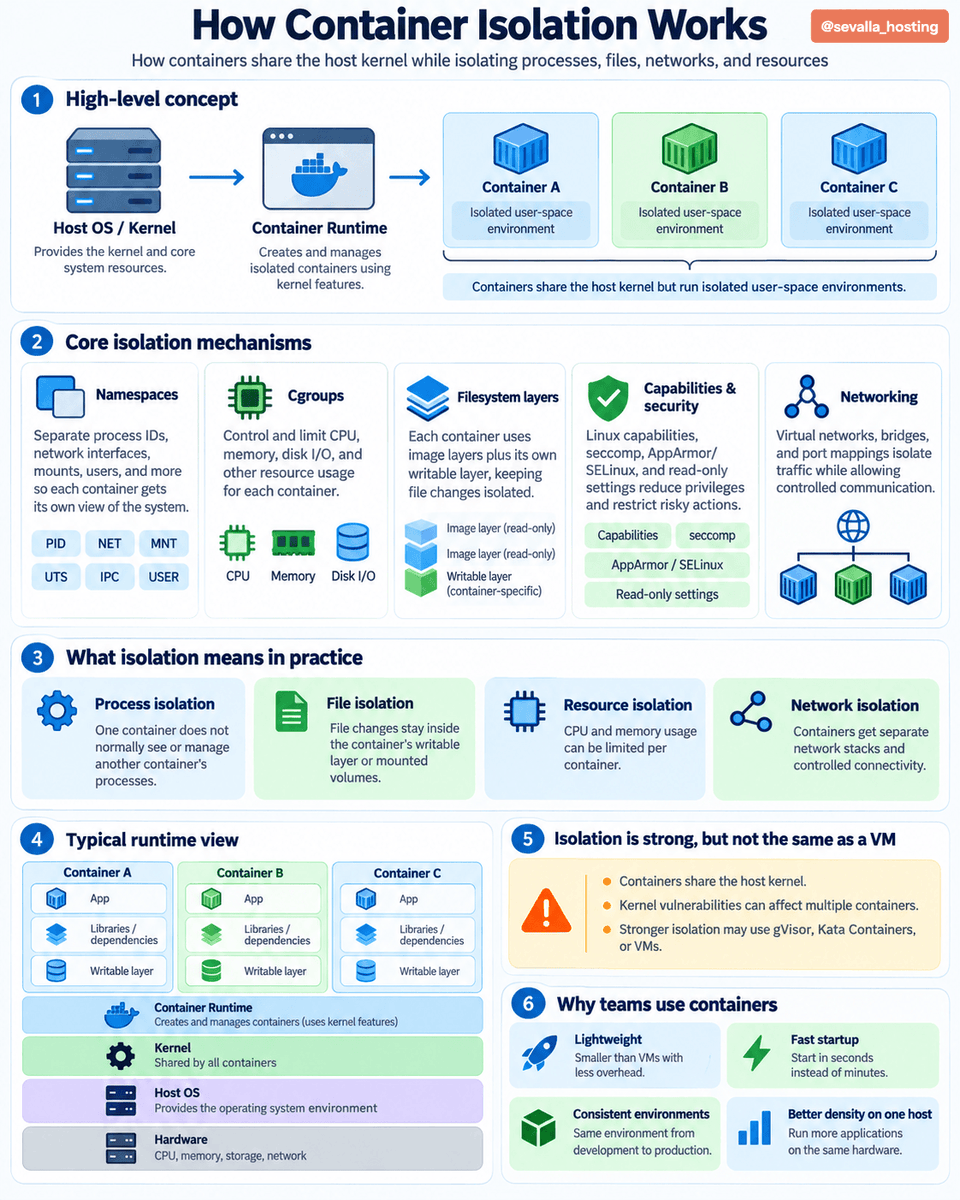
How Container Isolation Works 🐳 Containers run isolated applications while sharing the same host OS kernel. But how does that isolation actually work? 👇 🔹 Namespaces - Give containers separate views of processes, networks, users, and filesystems. 🔹 Cgroups - Control and limit CPU, memory, and disk I/O usage. 🔹 Filesystem Layers - Combine read-only image layers with a writable container layer. 🔹 Linux Capabilities - Restrict privileged operations available to containers. 🔹 Seccomp & AppArmor - Reduce security risks by restricting system calls and access. 🔹 Network Isolation - Uses virtual networks, bridges, and port mappings to control communication. Unlike virtual machines, containers share the host kernel instead of running a separate OS. 🖥️ This makes them lightweight, fast to start, and resource-efficient. ⚡ But isolation isn't absolute - kernel vulnerabilities can affect multiple containers. The result: consistent environments, better resource utilization, and scalable application deployments. 🚀
Load Balancing in System Design ➤ What is Load Balancing? → Definition: The process of distributing incoming network traffic across multiple servers to prevent any single server from becoming overloaded. → Goal → Improve performance → Increase availability → Distribute workloads → Prevent bottlenecks → Load balancers sit between clients and backend servers. → Example → 1,000 requests arrive → Load balancer distributes them across 5 healthy servers → Each server handles approximately 200 requests, assuming equal distribution. ➤ How Load Balancing Works → Client sends a request → Load balancer receives the request → Checks server health and availability → Selects an appropriate backend server → Forwards the request to that server → Server processes the request and returns a response → If a server fails → Health checks detect the failure → Traffic is redirected to healthy servers. ➤ Why Load Balancing Matters → Prevents individual servers from becoming overloaded → Improves application responsiveness → Increases availability through server redundancy → Supports horizontal scaling → Enables maintenance with reduced service disruption → Helps applications handle traffic spikes → Common use cases → E-commerce → Social media → Streaming platforms → Banking systems → Cloud applications ➤ Types of Load Balancers → Layer 4 Load Balancing → Operates at the transport layer (TCP/UDP) → Routes traffic using network information such as IP addresses and ports → Offers efficient, low-overhead traffic distribution → Layer 7 Load Balancing → Operates at the application layer (HTTP/HTTPS) → Routes requests using URLs, headers, cookies, or hostnames → Supports content-based routing and application-aware decisions → Hardware Load Balancers → Dedicated physical appliances → Common in traditional enterprise infrastructure → Can provide high performance but may increase infrastructure costs → Software Load Balancers → Run as software on servers or virtual machines → Flexible and configurable → Examples → NGINX → HAProxy → Envoy → Cloud Load Balancers → Managed load-balancing services offered by cloud providers → Examples → AWS Elastic Load Balancing → Google Cloud Load Balancing → Azure Load Balancer ➤ Common Load Balancing Algorithms → Round Robin → Sends requests to servers in a repeating sequence → Best for servers with similar capacity and relatively uniform workloads → Weighted Round Robin → Assigns more requests to servers with higher weights → Useful when backend servers have different capacities → Least Connections → Routes traffic to the server with the fewest active connections → Useful when requests take different amounts of time to complete → Weighted Least Connections → Considers active connections and server capacity → Helps distribute workloads across heterogeneous servers → IP Hash → Uses a client's IP address to select a backend server → Can help maintain routing consistency, but does not guarantee session persistence in every configuration → Least Response Time → Selects servers based on response time and, depending on the implementation, active load → Helps direct traffic toward more responsive instances ➤ Health Checks and Failover → Active Health Checks → Periodically send probes to backend servers → Passive Health Checks → Detect failures from actual traffic → Unhealthy Server → Stop sending new requests to that server → Recovery → Return the server to service after it passes health checks → Failover → Redirect traffic to healthy alternatives → Important → Health checks reduce the impact of failures, but they do not eliminate every failure scenario. ➤ Load Balancing Architecture → Client Requests → Load Balancer → Server 1 → Server 2 → Server 3 → Server N → Shared Cache → Database → Read Replicas → Traffic increases → Add backend instances → Server fails → Redirect traffic to healthy instances → Traffic decreases → Scale down excess capacity → For critical systems → Deploy redundant load balancers to avoid creating a single point of failure. ➤ Challenges in Load Balancing → Uneven traffic distribution → Session persistence and state management → Health-check configuration → Backend server failures → Load balancer capacity limits → TLS termination and certificate management → Cross-region routing and network latency → Maintaining observability across multiple servers ➤ Load Balancing vs Auto Scaling → Load Balancing → Distributes traffic across available servers → Auto Scaling → Adds or removes server instances based on demand → Load balancing helps distribute existing capacity → Auto scaling adjusts the amount of available capacity → Together → Support responsive, scalable applications ➤ In System Design Interviews → Estimate incoming traffic and peak requests per second → Identify potential server bottlenecks → Choose Layer 4 or Layer 7 load balancing → Select an appropriate routing algorithm → Explain health checks and failover → Discuss stateless services and session management → Consider multi-zone or multi-region deployment → Evaluate latency, availability, cost, and operational complexity ➤ System Design Handbook → A practical guide to mastering system design fundamentals and distributed architectures → Covers load balancing → Scalability → Consistency → Fault tolerance → Durability → Caching → Databases → CAP Theorem → Designed for developers preparing for system design interviews and building reliable production systems Get the System Design Handbook here: codewithdhanian.gumroad.com/l/urcjee

🌐 What happens when you type a URL into your browser? Understand the entire journey in 11 steps, from DNS resolution and TCP/TLS handshakes to load balancing, databases, and browser rendering. Save this before your next interview! 🚀


Give me 2 mins & I'll teach you how JWT works:


𝗠𝗖𝗣 𝘃𝘀 𝗔𝗣𝗜 𝘃𝘀 𝗦𝗸𝗶𝗹𝗹𝘀. An 𝗔𝗣𝗜 defines how software systems communicate through specific endpoints, requests, and responses. It gives applications a structured way to access data or trigger functionality in another system. 𝗠𝗖𝗣 (Model Context Protocol) standardizes how AI applications discover and interact with external tools, data, and resources. Instead of building custom integrations for every AI client, MCP servers expose capabilities through a common protocol that agents can use. 𝗦𝗸𝗶𝗹𝗹𝘀 package reusable instructions, workflows, and resources that guide agents through specific tasks. Rather than providing new connections to external systems, they give agents task-specific procedures and know-how they can load when needed. Together, they help agents connect to systems and use those capabilities to complete tasks. But building all these integrations and workflows from scratch takes time. Precisely AI Studio helps builders build faster with 𝗿𝗲𝗮𝗱𝘆-𝗺𝗮𝗱𝗲 𝗔𝗜 𝗮𝗴𝗲𝗻𝘁𝘀, 𝗮𝗽𝗽𝘀, 𝗮𝗻𝗱 𝘀𝗸𝗶𝗹𝗹𝘀 𝗰𝗼𝗻𝗻𝗲𝗰𝘁𝗲𝗱 𝘁𝗵𝗿𝗼𝘂𝗴𝗵 𝗠𝗖𝗣. Builders can explore and test them using sample data, then bring agents and skills into their existing AI stack. Explore Precisely AI Studio → lucode.co/precisely-ai-s… What else would you add? —— ♻️ Repost to help other learn AI. 🙏 Thanks to @PreciselyData for sponsoring this post. ➕ Follow me ( Nikki Siapno ) to improve at AI and system design.
Kubernetes (Explained Visually) - Step by Step
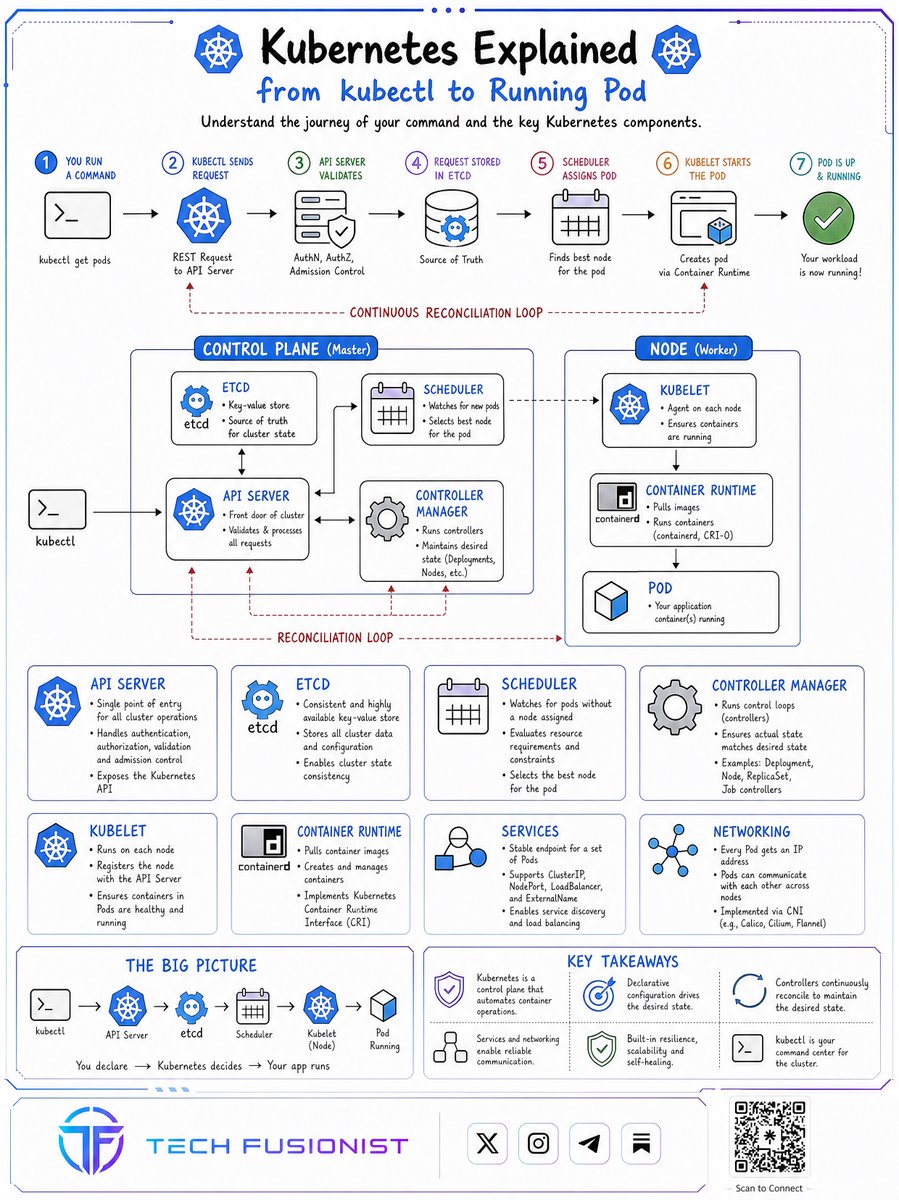
Want to master Kubernetes from scratch? 🚀 Follow this 30-day visual learning plan to go from beginner basics to real-world Kubernetes projects, one step at a time. x.com/i/article/2110…
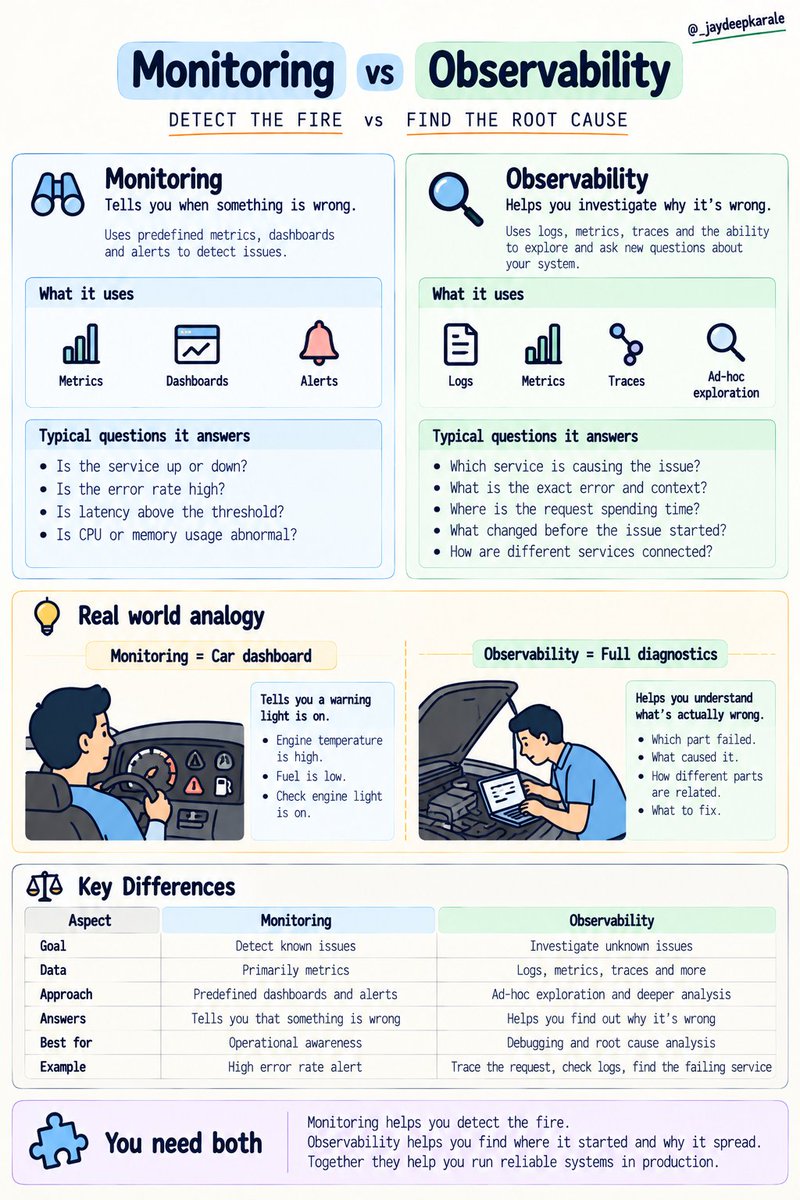
Monitoring vs Observability. They sound similar, but they solve different problems. Monitoring tells you when something is wrong, using metrics, dashboards, and predefined alerts. Observability helps you investigate why it's wrong, using logs, metrics, traces, and the ability to explore system behavior. Monitoring helps you detect the fire. Observability helps you find where it started and why it spread. You need both to run reliable systems in production.
Production debugging isn't about randomly checking logs until you find something suspicious. Follow a structured approach: • Understand the impact. • Check metrics for patterns. • Use traces to locate the bottleneck. • Inspect logs for the exact error. • Identify the root

Production debugging isn't about randomly checking logs until you find something suspicious. Follow a structured approach: • Understand the impact. • Check metrics for patterns. • Use traces to locate the bottleneck. • Inspect logs for the exact error. • Identify the root cause. • Fix, verify, and monitor.
Monitoring tells you something is wrong. SLOs help you decide how much it matters. • SLI: What are we measuring? • SLO: What level of reliability are we targeting? • Error budget: How much failure can we afford? • Alerting: When should someone take action? Good


☸️ Kubernetes Gateway API — the modern way to manage traffic. Ingress worked well, but modern applications need more flexible traffic management. Meet Gateway API 👇 → GatewayClass defines the controller → Gateway handles traffic entry points → HTTPRoute defines routing rules → Supports advanced traffic management → Enables role-based configuration 🔥 Learning Kubernetes? Understanding Gateway API is becoming increasingly important for DevOps and Platform Engineers. Save this visual for your next Kubernetes revision. 🔖 #Kubernetes #DevOps #PlatformEngineering #CloudNative


Kubernetes Pod Networking — explained visually. Every Pod gets its own IP. Pods can communicate across nodes. Services provide stable access to changing Pods. CNI plugins connect the cluster network. Understand these 4 concepts, and Kubernetes networking starts making sense. Save this for your next K8s revision. 🔖 #Kubernetes #DevOps #CloudNative


Tech Fusionist | Kush... @techyoutbe
59K Followers 2K Following Simplifying Cloud, DevOps, AI & Security into visual guides. 🛠️ 🚀 https://t.co/vriwNcHo2F 🌎 Helping 100K+ engineers build faster 📩 DMs open for collabs
Microsoft Developer @msdev
530K Followers 49 Following 👇 Join @GitHub Universe in person or virtually and get your pass today.
Visual Studio @VisualStudio
536K Followers 11 Following The most comprehensive IDE for .NET and C++ devs on Windows. It's packed with a sweet array of tools to elevate every stage of software development.
Google Cloud Tech @GoogleCloudTech
1.3M Followers 2K Following Follow along for how-tos, demos, product news, and more. For company updates, check out @GoogleCloud.

Kubernetes @kubernetesio
328K Followers 86 Following #Kubernetes: open source production-grade container orchestration management. #CNCF #K8s
Azure Functions @AzureFunctions
41K Followers 508 Following The official account of the Azure Functions product team ⚡️ YouTube: https://t.co/e0BelnsOyN GitHub: https://t.co/ttMazZg3mu
Python Hub @PythonHub
156K Followers 3 Following Human-curated Python news, projects, articles & tools. Support: https://t.co/z5ihtHB4jY Suggest a Link: https://t.co/gOWyInLqhy
Azure SQL @AzureSQL
19K Followers 172 Following The official handle for Azure SQL family - innovation & value in the cloud. Follow for news & updates from the #AzureSQL team & community. 🎦: https://t.co/3wle2phajk
DevOps on Azure @AzureDevOps
96K Followers 360 Following Deliver innovation faster with simple, reliable tools for continuous delivery. Official handle of Azure DevOps at Microsoft
Azure Support @AzureSupport
138K Followers 725 Following Official Microsoft Azure account for improving the customer experience by connecting the Azure community to the right resources - answers, support, and experts.
Microsoft Azure @Azure
1.1M Followers 21 Following Limitless innovation. ☁️ Follow along for the latest news and resources from the official #MicrosoftAzure team. For help, contact @AzureSupport.
freeCodeCamp.org @freeCodeCamp
1.2M Followers 157 Following We're a community of millions of people who are learning math, programming, and computer science together. A 501(c)(3) public charity. Tweets by @abbeyrenn.
Curious Minds @CuriousMindsHub
153K Followers 4K Following Books • Brain Science • Psychology • Better Thinking
Treasury Department @USTreasury
1.2M Followers 200 Following Executive agency responsible for promoting economic prosperity & ensuring financial security of the United States. Led by 79th Treasury @SecScottBessent
McKinsey Global Insti... @McKinsey_MGI
207K Followers 3K Following We provide a fact base to aid decision making on the economic and business issues most critical to the world.
McKinsey & Company @McKinsey
661K Followers 1K Following Since 1926, the trusted advisor to the world's leading businesses, governments, and institutions. 130+ offices in 65+ countries.

AWS Education @AWS_Edu
551K Followers 571 Following Updates, resources, events, & news about ☁️ education & #AWSEducate. Follow our other #AWSPublicSector accounts: @AWS_Nonprofits & @AWS_Gov
Amazon Web Services @awscloud
2.2M Followers 433 Following AWS is the world's most comprehensive cloud, enabling organizations to accelerate innovation, reduce costs, and scale more efficiently.
AWS Startups @AWSstartups
266K Followers 67 Following Get started, scale up. For founders and everyone in the build.
AWS for Government @AWS_Gov
631K Followers 1K Following Info on AWS resources, events, news, products & services for national & state/local governments. Also follow us at: @AWS_Edu & @AWS_Nonprofits

SpaceX @SpaceX
41.9M Followers 127 Following SpaceX designs, manufactures and launches the world’s most advanced rockets and spacecraft

Microsoft @Microsoft
13.1M Followers 1K Following We're on a mission to empower every person and every organization on the planet to achieve more. Support: @MicrosoftHelps

Shruti Codes @Shruti_0810
106K Followers 401 Following Regular Tech & AI Updates 💻 | Sharing Free Resources 🌐 | Collabs: [email protected] | Daily Tech news
Windows Latest @WindowsLatest
59K Followers 11 Following We provide all the latest news and reviews of Microsoft, Windows, Windows Phone, Surface and Xbox devices. We are not affiliated with Microsoft.

Steve Ballmer @Steven_Ballmer
3.1M Followers 199 Following Lots going on: follow what's new @LAClippers 🏀 and @USAFacts 📊. Also busy with @BallmerGroup.
Bill Gates @BillGates
65.3M Followers 573 Following Sharing things I'm learning through my foundation work and other interests.

The Hill @thehill
4.2M Followers 353 Following The Hill is the premier source for policy and political news. Follow for tweets on what's happening in Washington, breaking news and retweets of our reporters.
Donald J. Trump @realDonaldTrump
111.8M Followers 53 Following 45th & 47th President of the United States of America🇺🇸
The New York Times @nytimes
53.9M Followers 847 Following We seek the truth and help people understand the world. Not a subscriber? Your first month is now free in our app. https://t.co/e2FWJZOvXD
Trends for United States
You might like















