

Learn Copilot with Rishona @LearnCopilot
Microsoft Copilot tips, prompts and shortcuts 🪄 Learn how to save time in Outlook, Teams, Word, Excel and PowerPoint with Copilot. rishonapowerplatform.com Joined September 2026-
Tweets98
-
Followers37
-
Following13
-
Likes50
When you ask Copilot to build a something from scratch in Excel, add to your prompt "include fictional data". This way you can get a clear understanding of what it created for you.

@m365show Interactive slides are great for inserting quizzes. Also, give it an instruction manual, it can animate a visualise the steps. Opens up so many doors to making teaching more engaging
Keep your class on track with a countdown timer built directly into your PowerPoint presentation⏰ You can choose a duration, then display the countdown while attendees take a break or complete an activity. When time runs out, an alarm sounds so everyone knows when to return. Try the prompt below in Copilot for PowerPoint ⤵️
Fixing up date formats every time Copilot creates something for you can get repetitive. Set it as a personal instruction in Excel once: Open Excel > Copilot >... > Personalization Then add the instruction: "Dates should be in the format DD/MM/YYYY"
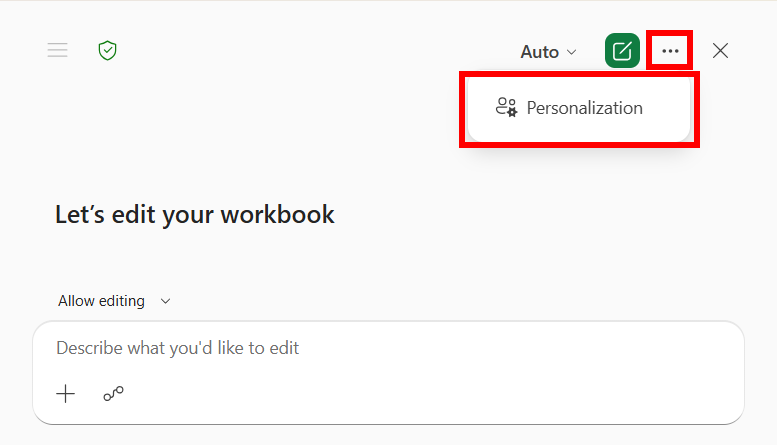
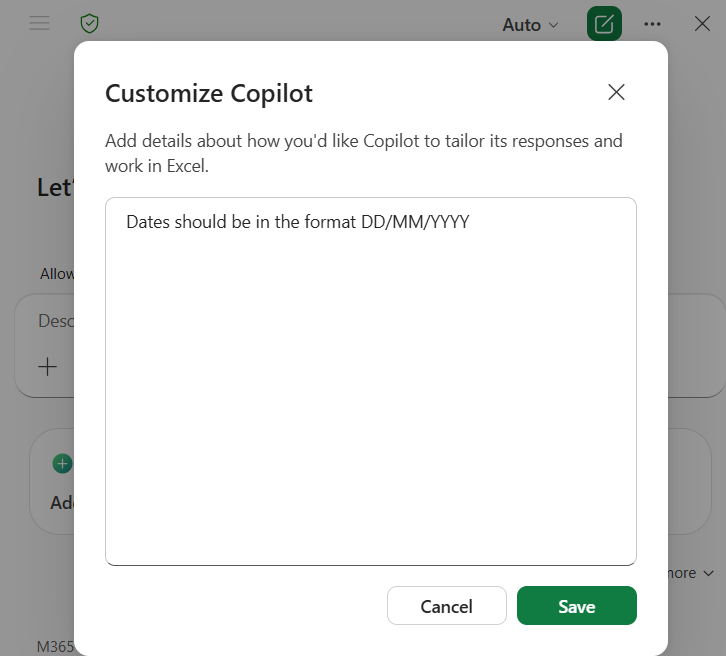
@m365show Yep- both web and desktop 🔥
@brijones Amazing! I often get asked about VBA with Copilot- this will make a lot of people happy
This uses a new Copilot PowerPoint feature called “interactive slides”. It’s still new, so you may only get the prompt to work when using PowerPoint in a web browser. Either way, the slide will still work while presenting from the PowerPoint desktop app.
PROMPT ✒️ "Use the interactive slides skill and create a break slide with a countdown timer. When the timer reaches zero, play a bell chime and show that the break is over. Include preset break time options, with the ability to add a custom time When the break starts, automatically hide the configuration buttons, but show the ability to bring them back. Start/Pause and Reset buttons stay visible all the time Design: [Add your preferred colours, fonts, dial style and any other design details here. OR leave this section blank, and it will use the theme of your current presentation]"
Researcher and Analyst in Copilot do different jobs. 🔍Use Researcher for background, context and comparisons. 📈 Use Analyst when you have data and need calculations, trends or forecasts.
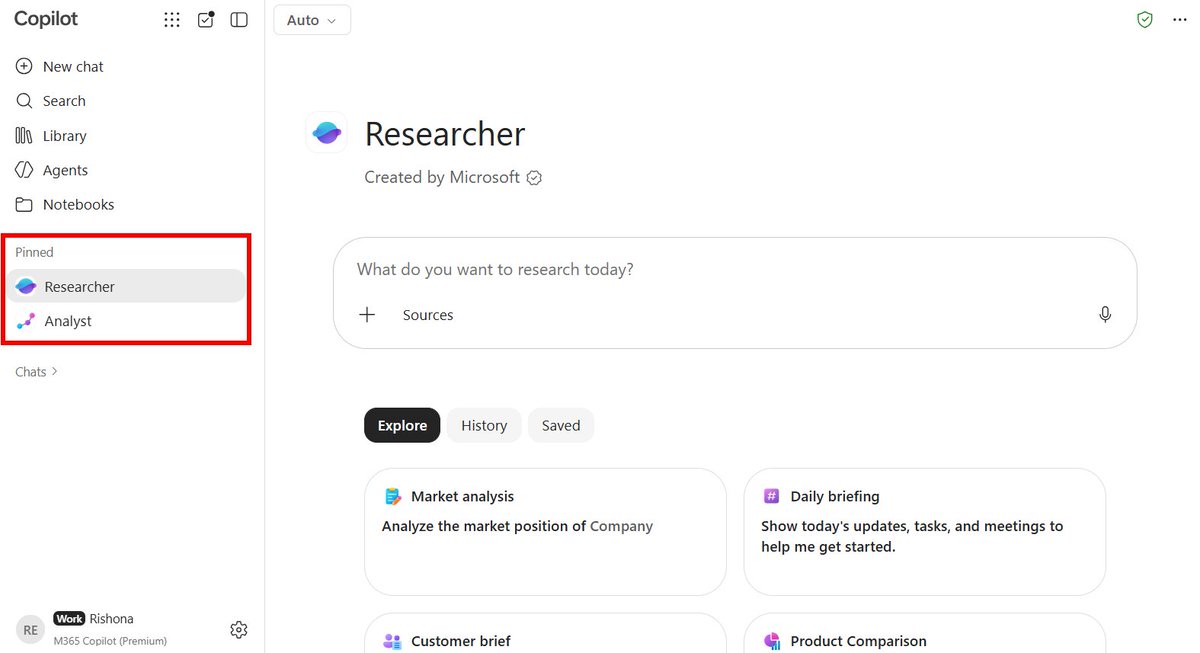
When your data is spread across spreadsheets, CSVs and a Word document, use the Analyst agent in Copilot. Attach them all and ask one question. It reads across every file for you.

💡 You don't need to memorise Excel functions. Ask Copilot for a worked example instead: "Give me an example of how to use =[FUNCTION NAME] in Excel." It explains the syntax and shows you a realistic scenario.
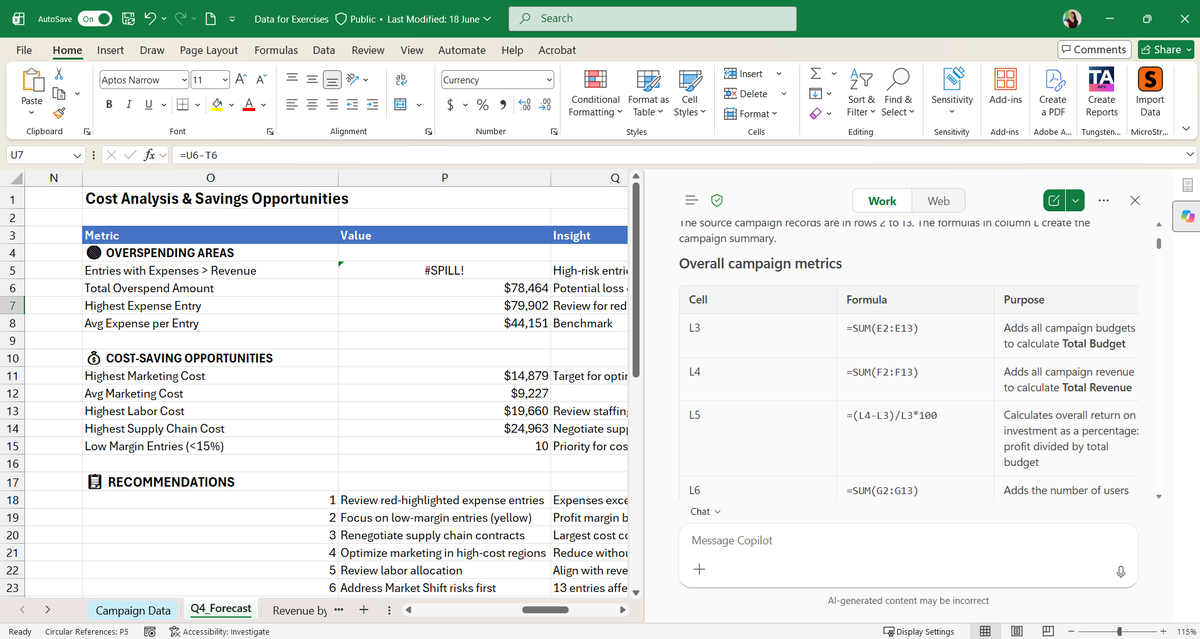
An inherited spreadsheet full of mystery formulas doesn't need to be reverse engineered cell by cell. Open Copilot in Excel and ask: "Explain all of the formulas used in this spreadsheet and their purpose" You'll get a plain English breakdown of what each part does.
One-shot with Opus 5.5 💪 I gave it images of sewing pattern instructions, and asked it to turn it into a visual, step-by-step guide for a beginner. Even added in a sizing calculator!
A table pasted into your Word doc as an image can't be sorted, edited or updated. Ask Copilot to read the image and rebuild it as a real table. PROMPT 🖊️ "Turn the table in the selected image into an editable table"

Coming back to a document full of open comments is overwhelming. Ask Copilot in Word for a review summary first 💬 PROMPT: "Go through all unresolved comments and create a short Review Summary section at the top that captures (1) proposed changes in the document and (2) open questions from comments"
When every stock photo starts to look the same, describe the visual you need and let Copilot in PowerPoint create it for your slide. Then refine it with follow up prompts. PROMPT: "Create an image for slide [number] showing [description], using the colours in this presentation"

Typing a table of contents by hand means fixing page numbers at the end. Ask Copilot in Word instead: "Insert a table of contents" It's built from your heading styles, so it can be updated as the document changes. Try it in Word Online: word.cloud.microsoft
The Copilot in PowerPoint skill "Create Interactive Slides" is starting to roll out more widely now. I've used for creating an icebreaker activity for a training session and turning raw data from a spreadsheet into a dashboard. It can even create a cooking tutorial 🥪
Found the perfect icon in the wrong colour? Select it, open Copilot in PowerPoint and type: "Update the colour to [colour/hex code/or attach your brand kit]"

Copilot can reuse images and icons and apply them throughout your PowerPoint presentation. Try this prompt: "Use the icons on slide [number] throughout the presentation to make the slides more visually appealing. You do not have to use all icons, and you can reuse the same one. Make sure the icon used represents the content discussed on the slide."


Gusristic @gusristic
0 Followers 1K Following
Eric Henry @Min_solanafk
393 Followers 2K Following
B Man77 @BenCasey77
39 Followers 205 Following
Aadarsh @Sable_Do
335 Followers 309 Following Azure Cloud Engineer ☁️ Practical Azure, Databricks & automation tips. Cloud troubleshooting, AI and a little tech humor.
Thiago Beier @thiagobeier
518 Followers 2K Following Cloud Solutions Architect (SfMC) @microsoft | MVP Intune | Views & opinions are mine

Alberto Lamberti @alcala94131
46 Followers 331 Following

Noir angele @noir_angele
925 Followers 3K Following Mom, pilot partner , geek, loyal friend , will protect the innocent . not the opinions of my employer .🇮🇱🇺🇦
lawRen7 @Law_Ren7
6 Followers 90 Following
Kinga Brot @bluredwhite
3 Followers 68 Following
MM @pearlcore53
350 Followers 1K Following
Juliet Anthonysamy @JulietAnth62962
0 Followers 7 Following
Carlos Callegari @CallegariCarlos
66 Followers 187 Following Padre y Nefrologo, con conciencia ambiental.
nata @havreeluuuke
250 Followers 2K Following Ще не вмерла України і слава, і воля, Ще нам, браття молодії, усміхнеться доля. Згинуть наші воріженьки, як роса на сонці.
Rod Hocking @RodHocking
0 Followers 1 Following
Judii @_missjudii
4 Followers 105 Following
Noah @noahdev27
35 Followers 154 Following Building @SilestisAI & SonWeave. Notes on building apps with AI, product decisions, and experiments that worked or failed.

Claude Champion @c_brown1961
130 Followers 4K Following Father, husband, sports junkie & always enjoy a good meal
Ed Wilkinson @edwardw771
15 Followers 188 Following

Jacob Shellabarger @JShellabargerMO
123 Followers 848 Following Follower of Christ, Dawn's Husband, Eric & Audrey's Dad, Prosecutor, IndyCar & Chiefs fan. 🏁RT's or likes don't mean I always agree. Mexico, Missouri, USA.
saurabh kumar @saurabh7331
134 Followers 3K Following
tim brander @timrhysb
8 Followers 46 Following
David Cox @DvidCx
0 Followers 19 Following
Brian Pelser @bria91133
0 Followers 5 Following
Ida @Idawaam
0 Followers 1 Following

essa @MohammadE_Muj
5 Followers 166 Following
Selena Elijah @SelenaElij71686
1 Followers 31 Following
Inogic | Copilot • ... @inogic
4K Followers 5K Following Explore 20+ #CRM #Dataverse Apps @Maplytics, Doc Mgmt, Visualization, Productivity apps et al. Your go-to for #MSDyn365 #PowerPlatform #AI #Copilot services!
Random People @Lawr3nce07
19 Followers 368 Following
Jake @jk_893
1 Followers 73 Following
Rishona Elijah @RishonaElijah
346 Followers 143 Following Microsoft MVP (Business Applications) | Copilot, AI & Power Platform Trainer https://t.co/c3tQsW0I9N
m365.show @m365show
7K Followers 44 Following https://t.co/xVJPwV2jqM – Microsoft 365 community platform Podcast 🎙 https://t.co/vRBoRB4DWk | Conference 🎤 https://t.co/lFM8SMdEK5
Brian Jones @brijones
3K Followers 319 Following I lead Excel at Microsoft. Thinking about the role spreadsheets play when people and AI work together.
Sumit Chauhan @sumit_c
2K Followers 117 Following EVP, Office Product Group at Microsoft | Reimagining work with Microsoft 365 Copilot across Word, Excel, PowerPoint, Outlook, ClipChamp + OneNote
Microsoft Education @MicrosoftEDU
439K Followers 4K Following Behind every transformation is a person finding a way forward. ✏️ Stories from educators and students using Microsoft tools to learn and teach.
Microsoft 365 Insider @Msft365Insider
43K Followers 728 Following The official account of the Microsoft 365 Insider Program. Join us and help shape the future of Microsoft 365. Find us on LinkedIn: https://t.co/6ti7pekGuE

Josh Cook | Microsoft... @FlowAltDelete
4K Followers 519 Following The pilot of Copilot | Microsoft MVP 🏆 | Power Platform Expert 🚀 | low code & AI orchestrator | Autonomous agents work 24/7, are cheaper and smarter than you
Derek Johnson @DerekJohnsonSV
1K Followers 665 Following General Manager for PowerPoint and visual creation in Copilot. Opinions are my own.
PowerPoint @powerpoint
55K Followers 57 Following News and tips from the Microsoft #PowerPoint team. Support: https://t.co/JDn3yX1nGw or @MicrosoftHelps.
Microsoft @Microsoft
13.1M Followers 1K Following We're on a mission to empower every person and every organization on the planet to achieve more. Support: @MicrosoftHelps
Microsoft Copilot @MSFTCopilot
344K Followers 39 Following Made by the people who sit in meetings too
Microsoft Learn @MicrosoftLearn
517K Followers 12K Following Empowering everyone to build skills and achieve more through learning. Spark possibility ✨
Rishona Elijah @RishonaElijah
346 Followers 143 Following Microsoft MVP (Business Applications) | Copilot, AI & Power Platform Trainer https://t.co/c3tQsW0I9NTrends for United States
You might like


















